Burning Bridges AI video: photo guide & real example
One portrait. A new lead at the party.
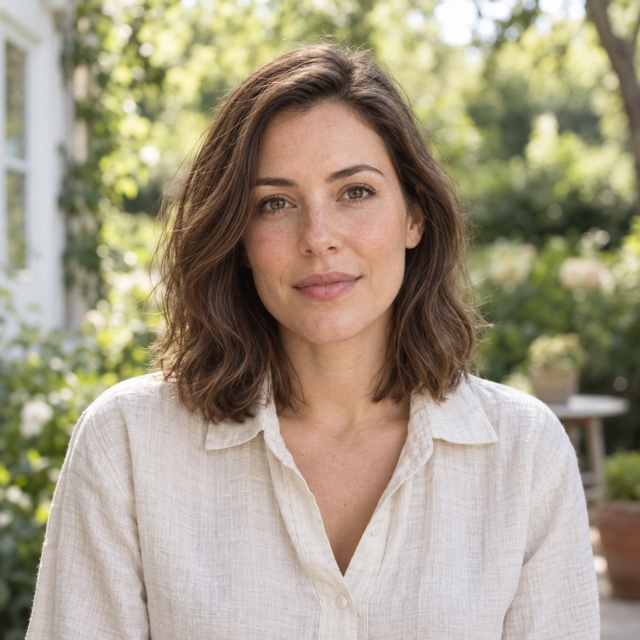
A real output from our separate Burning Bridges project: one portrait, an AI-generated party template and Seedance 2 Fast. The sample person is AI-created. This is a generated example, not the original music video or a guarantee of your result.
What is the Drake Burning Bridges AI video trend?
People searching for “Drake Burning Bridges AI video” usually want to place themselves into the party-style clip: a foreground lead, a raised cup, chandeliers and a lively supporting cast. The subject is the video effect, rather than a literal bridge on fire.
There are two ways to approach it. A text-to-video prompt can create a new party scene, while a reference-video edit gives the model a particular sequence of gestures and camera movement to follow. A similar-looking room does not mean the actions will match. The example above uses the second approach with an AI-generated template, not the original music-video file.
This is an independent guide. It is not an official Drake product and does not include the original song, voice cloning or exact lyric-matched lip sync.
How to make a Burning Bridges AI video from a photo
1. Choose one clear portrait. Start with a single adult looking toward the camera, with the face and hair visible. Even lighting and an unobstructed face give the model more useful information than heavy filters, sunglasses or a tiny face in a group shot. Use a photo you have permission to use.
2. Open the Burning Bridges studio. Upload your portrait in its single photo slot. The fixed AI-generated party template is already supplied; you do not need to find a motion clip or write a prompt. Use your existing Hotel Lobby account and balance.
3. Check the take and generate. The studio fixes the output at 15 seconds, 720p, 16:9 and no audio, for 1,000 credits per attempt. The intended edit changes the lead’s face and hair while keeping the template outfit, party and actions. Confirm permission to use the photo, then generate when the service is available.
4. Review the full result. Watch the face and hairstyle at the beginning, middle and end; check hands, the cup, clothing and the background guests. A clear first frame does not establish that the identity stays consistent throughout. AI can still change details even when the prompt asks it not to.
5. Download, then add permitted audio. Review the complete edit before posting. Adding a song changes the soundtrack; it does not automatically make the mouth movements match the lyrics. Keep a downloaded copy rather than relying on a temporary provider link.
What the example does and does not show
The portrait above is the identity reference for the main host. The party, supporting cast, outfit and action come from the template. Only the lead is the intended replacement target; this is not a workflow for selecting or replacing every background guest.
The full sample is available to play before you choose a tool. It demonstrates one completed take. It does not establish a success rate, guarantee an exact likeness or show a live purchase and delivery on this website. The 15-second label is the finished video length, not a promise about processing time.
Burning Bridges AI video vs Hotel Lobby AI
Both start with photos and a recognizable video scene, but the cast and staging are different. Pick the scene you actually want before buying credits or a video.
| Question | Burning Bridges example | Hotel Lobby studio |
|---|---|---|
| Main cast | One foreground lead; supporting party guests | Two adults performing together |
| Photos | One portrait of the lead | Two separate portraits, one per adult |
| Setting | A chandelier-lit party with a cup-holding host | An orange booth with a hanging microphone |
| Shown output | 15 seconds · 720p · 16:9 | Default: 10 seconds · 1080p · 16:9 |
| Sound | Silent; no original song included | Silent; no original song included |
| On this website | One-photo generation studio with the shared Hotel Lobby balance | Photo upload and Hotel Lobby generation studio |
A starting prompt for a reference-video edit
Add your permitted motion clip as @Video1 and the lead’s portrait as @Image1 in a tool that accepts both. Adapt these labels to the tool’s reference controls. This prompt describes the intended edit; it does not include the video template or guarantee the result.
Edit @Video1 by replacing only the foreground cup-holding host with the adult in @Image1. Use the portrait to preserve the person’s face and hairstyle throughout. Keep the template outfit, supporting guests, party setting, camera movement and action timing as closely as possible. One continuous 15-second shot. No extra characters, text, speech or music. Do not change the background cast.
Burning Bridges AI video questions
Can I generate a Burning Bridges video on this page?
This is the guide page. Open the Burning Bridges studio on this website to upload one portrait and generate a fixed 15-second, 720p, silent party video for 1,000 Hotel Lobby credits. Availability is shown in that studio.
Can I make a Burning Bridges AI video with one photo?
The demonstrated workflow uses one portrait for the main host and a separate reference video for the party and motion. Choose a photo with one clear adult face. A photo alone does not supply the template’s camera movement or action sequence.
Does the example include the Burning Bridges song?
No. The example is silent. The workflow requests no generated audio and includes no music rights, voice clone or exact lyric-matched lip sync. Add audio you are permitted to share in your editing or social app.
Is the Burning Bridges AI video workflow free?
Watching this example and copying the prompt are free. Personalized generation in the Burning Bridges studio costs 1,000 Hotel Lobby credits. New accounts receive no free generation credits; the shared $9.49 pack provides 1,000 credits for either studio. All packs and subscriptions use the same balance.
Can a prompt alone recreate the same video?
A prompt can describe the party, but a reference-video workflow also needs the actual motion clip. Copying the prompt does not supply a reference video, and it cannot make a photo-only model follow exact actions. Use a template you are allowed to use.
Will it keep every face, outfit and gesture exactly?
No. The intended edit changes the lead and asks to retain the template outfit, scene and supporting cast, but details can vary. Review the whole clip. Another creative attempt may incur another generation charge.
Can I use my Hotel Lobby credits for this effect?
Yes. The dedicated Burning Bridges studio uses your Hotel Lobby account and credit balance. Each fixed 15-second, 720p generation costs 1,000 credits. Check that the studio is available before buying a pack.
Ready to take the lead at the party?
Open Burning Bridges AI